I built a thing! Introducing topself.io

If you’ve followed exploring-art.com for any length of time, you know I’ve struggled with various task management and productivity applications, yet still love a good productivity or personal growth book. I’ve taken my love for the subject, frequently discussed here at exploring-art.com, and developed a framework – TopSelf.io. I’ve also launched a supporting Action Tracker App currently available on the Apple App Store.

The Action Tracker is a minimalist daily action tracker designed to help you build momentum and balance across six essential life themes:

  • Health
  • Wealth
  • People
  • Tasks
  • Learning & Growth
  • Retrospection & Gratitude

As I’ve developed the App, I’ve been using it on the daily and really enjoying it. If you’ve been struggling to find a productivity and motivation tool to keep you on track give it a try!

Habit List – Personal Commitments and Visual Management

I struggle to keep up with my chores. I procrastinate. I spend my time practicing escapism rather than being productive. My nature of sensible hedonism could typically be expressed in pseudo Spanish as “mañana”. It’s terrible… I know.

I also know that I am, like most people, exceptionally malleable… just look at my visual management, willpower and weight loss post… it’s 5.5 months later and I’m still down 18.1 pounds, simply by weighing myself daily on a fancy, graph generating scale… scary!

But what to do about all those commitments I most recently refactored in my post on personal commitments, “The Speed of Trust”, and poster art? Is there something I can do to help with them? Fortuitously after a few search attempts I happened upon Habit List an inviting, balanced, skeuomorphism rich app.
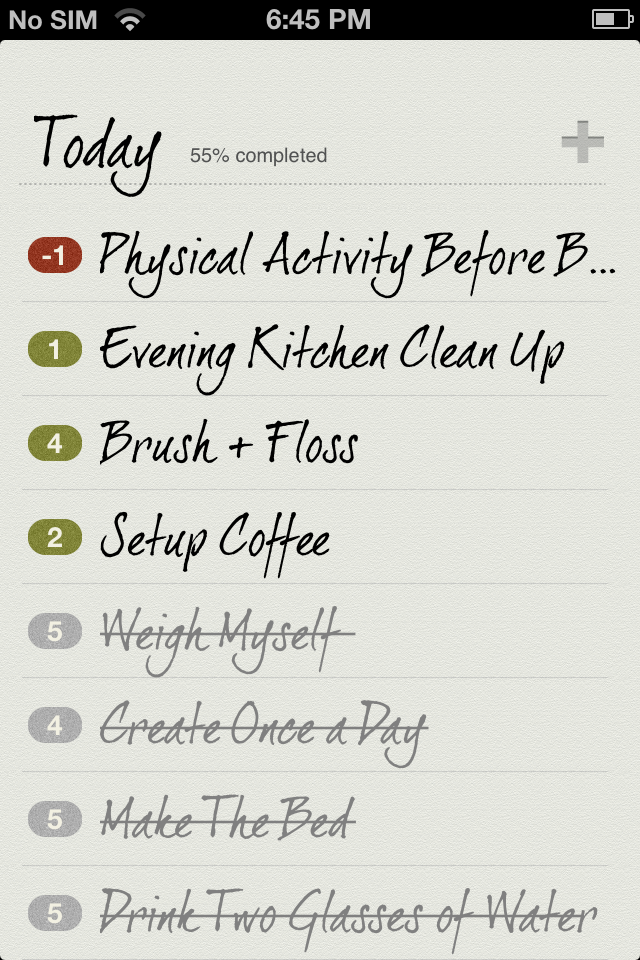
Habit List elegantly adds visual management to your recurring to-do list. Red dots along the left margin indicate you are not delivering on your commitments. Green dot’s mean you are doing well. The number centred in the dots indicate how many times you’ve either made or missed your commitment in the current streak.
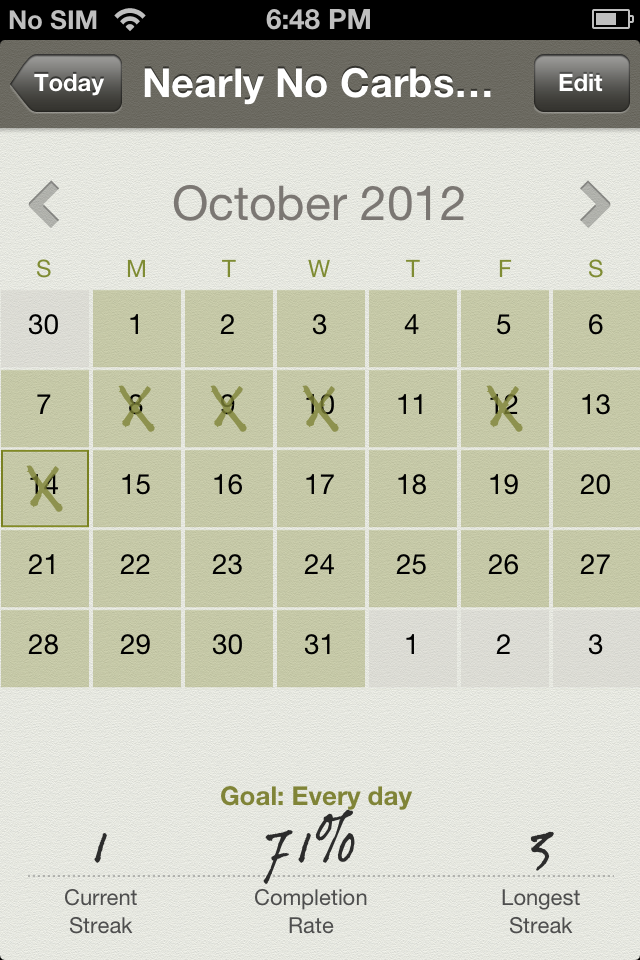
Each habit has its own exploded calendar view where details of your best streak, your current streak and your current completion rate are displayed. After just a week of using Habit List I’m addicted. Scratching items off the list feels rewarding. Daily reminders are much needed motivation and I’ve already grown my list of personal commitments. I am pleased to bestow 4.5 out of 5 stars on Habit List. There’s just one or two things missing.

Though the app has flexible scheduling options it’s still not enough. Working 9 out of 10 weekdays, and having some commitments that are only applicable when I am at home mean I either artificially pad or compress my streaks. I think there needs to be a “Not Applicable” option, perhaps only accessible from the calendar view, that allows the user to opt ad-hoc days out of the calculation of streaks for a specific habit. Also the ability to “snooze” reminders would help me procrastinate… I mean meet my commitments!

Habit List is well worth the $1.99. Do yourself a favour, get this app and start a routine of completion, you’ll be more productive and have fun while crossing things off your list.

Virtual Novel Writing Studio – Scrivener

As you know one of my implicit and poetic New Year’s resolutions was to get serious about writing… practice the art, improve my abilities and create. It’s a multi-front undertaking about blogging, school, journalling and because I am a ridiculously enthusiastic individual, it is also about writing a great Canadian novel.

The subject of the novel is super secret but it’s starting out as a piece of creative non-fiction, which means research, organization, time-lining, outlining and other structural undertakings. I like this as it plays to my professional background – a project manager. However it quickly starts to get messy in a regular word processor. You quickly arrive in a situation where you have multiple word documents such as an outline and a draft that need to be kept up to date separately, not to mention the meshed network of file folders for research, notes, drafts and other related files. So this got me thinking, there must be an app for this… and sure enough courtesy of Apple’s OS X App store I found Scrivener, and it is perfectly tailored for the job. The price tag was a little disconcerting at first at $44.99 so I headed over to the developers website to see if they had a demo and they did…

After installing the demo and reviewing some instructional material including a very helpful video, I started importing over all of my miscellaneous files into the Scrivener app. That done I felt at home in my very well organized virtual writing studio, so I purchased a version through the app store, and I’m happy to report that the upgrade from the demo to the app through Apple was seamless. My work was not disrupted, my files were not corrupted. Since then I’ve even penned the first page of my opus.

Watch out world! Mr Campbell and his partner Dr. Scrivener are on the case.